Serving Yoast SEO Sitemap from Your WordPress Headless using Nuxt

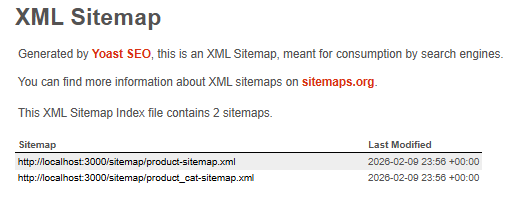
Headless WordPress + Nuxt: the content lives in WordPress, but the public-facing site runs entirely on the frontend. Search engines, however, need a sitemap with URLs from the frontend domain — not the backend.
In our case, we specifically needed the WooCommerce product sitemap, since the frontend keeps the exact same URL structure for products. So from an SEO perspective, we had to make sure Google indexed the frontend product URLs — not the WordPress ones.
Here’s the solution we implemented: a Nuxt proxy that fetches the sitemap from WordPress, rewrites the URLs to match the frontend domain, and serves it at /sitemap.xml.
Why Replacing URLs in WordPress Isn’t Enough
If you’re using WordPress with Yoast SEO, the sitemap is generated using home_url().
The issue starts when you try to replace those URLs using the wpseo_xml_sitemap_post_url filter so they point to the frontend domain. Yoast treats them as external URLs and removes them from the sitemap (it internally compares them against home_url() using get_link_type()).
The result? An empty sitemap.
We also tried other approaches — like using output buffering in WordPress or modifying the XML before it’s sent — and while those can work in some setups, they weren’t reliable in ours.
The cleanest and most stable solution was simple: don’t modify the sitemap in WordPress at all. Instead, serve it entirely from the frontend using a proxy.
What the Solution Does
- The frontend (Nuxt) exposes:
GET /sitemap.xml
Fetchessitemap_index.xmlfrom WordPress, replaces the WP domain with the frontend domain, and rewrites sub-sitemap links to/sitemap/post-sitemap.xml,/sitemap/product-sitemap.xml, etc.GET /sitemap/post-sitemap.xml,GET /sitemap/product-sitemap.xml, etc.
Fetches the corresponding file from WordPress (including the WooCommerce product sitemap) and rewrites all URLs to the frontend domain.GET /main-sitemap.xsl
Proxies Yoast’s XSL file to prevent 404 errors.
- WordPress continues generating the sitemap normally with its own URLs — including the WooCommerce product sitemap.
The frontend simply fetches, rewrites, and serves it. No changes to Yoast, WooCommerce, or the theme are required. - robots.txt on the frontend points to:
Sitemap: https://yourdomain.com/sitemap.xml
Crawlers only see the public domain.
Technical Details
- Nuxt (Nitro) routes:
server/routes/sitemap.xml.get.ts→ sitemap index.server/routes/sitemap/[name].get.ts→ sub-sitemaps (scoped under/sitemap/so regular routes like/shopor/productaren’t affected).server/routes/main-sitemap.xsl.get.ts→ XSL proxy.
- Shared utility:
server/utils/sitemap-proxy.ts
This utility:- Builds the correct WordPress URL (base + multisite path).
- Runs
$fetch. - Replaces all WP origin variants (http, https, protocol-relative) in the response body with the request origin.
- If it’s the index file, rewrites sub-sitemap
<loc>URLs to/sitemap/xxx.xml.
- Config variables:
NUXT_PUBLIC_WP_BASE_URLNUXT_PUBLIC_WP_SITEMAP_PATH(e.g.,site-1in a multisite setup)
Outcome
- The sitemap is available at the frontend’s canonical URL (
/sitemap.xml). - All
<loc>entries — including WooCommerce products — point to the frontend domain. - Sub-sitemaps and the XSL are served from the same domain with no 404 issues.
- Yoast and WooCommerce remain untouched.
- No fragile filters, no empty sitemap, no plugin hacks.